

Docker containers share one kernel for thousands of AI models, yet each one believes it owns the entire machine. That illusion of total ownership is what makes containerized AI workloads possible — and understanding how Docker constructs it reveals the real engineering beneath the hype.
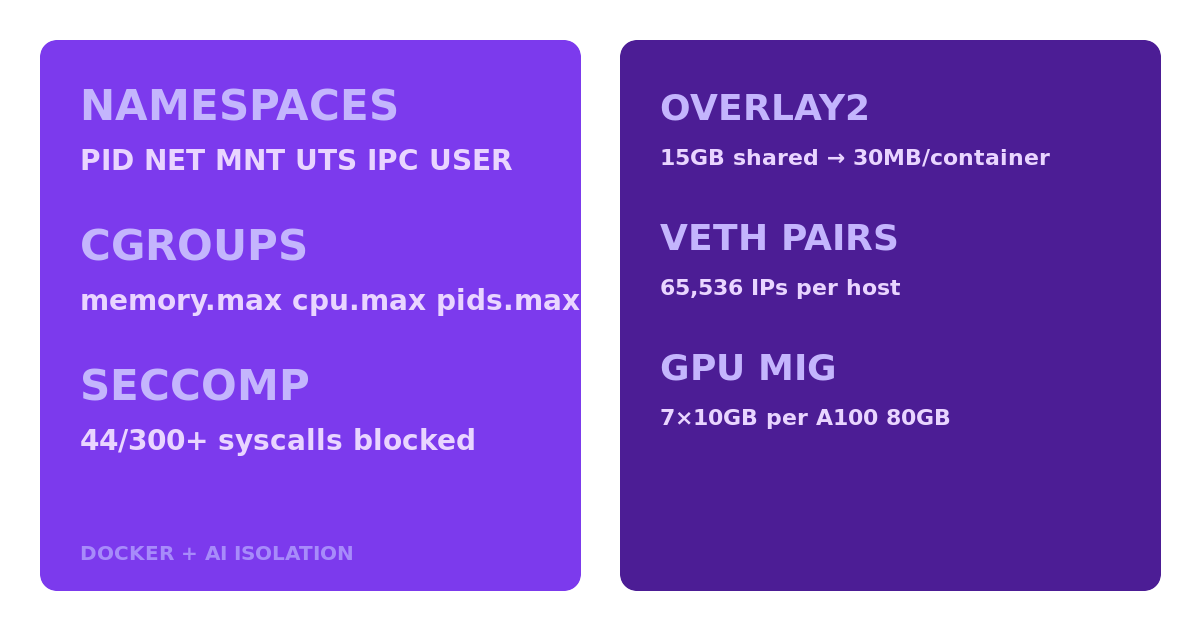
- Docker uses Linux namespaces introduced in kernel 2.6.24 in 2008, with the pivotal PID namespace allowing each container to have its own process ID 1, making 10,000+ containers share a single kernel possible
- NVIDIA’s Container Toolkit uses cgroups v2 device controller to allocate specific GPU memory slices—a single A100 80GB GPU can be partitioned into 7 separate 10GB MIG instances, each isolated to different containers
- Docker’s overlay2 storage driver creates copy-on-write layers where a 15GB PyTorch base image is shared read-only across 500 containers, consuming only 30MB additional storage per container for writable layers
When you run docker run pytorch/pytorch:latest, eight distinct steps fire in sequence — each one layering a different isolation mechanism on top of the last. Here is exactly what happens inside the kernel.
## Step 1: The clone() Call That Splits Reality
The Docker daemon receives your container start request and translates it into a single clone() syscall with six namespace flags: CLONE_NEWPID, CLONE_NEWNET, CLONE_NEWNS, CLONE_NEWUTS, CLONE_NEWIPC, and CLONE_NEWUSER. This is not a metaphor — it is literally one syscall that forks the process into six parallel realities at once.
Each flag tells the kernel to create a new namespace instead of inheriting the parent’s. The PID namespace gets its own process tree. The network namespace gets its own interfaces and routing table. The mount namespace gets its own filesystem view. The UTS namespace gets its own hostname. The IPC namespace gets its own shared memory segments. The user namespace maps container root (UID 0) to an unprivileged host UID, so the container “thinks” it has root while the kernel knows better.
Without these six flags, you would just have a regular process sharing everything with the host. With them, the process enters a world where it is alone — or at least, appears to be.
## Step 2: PID 1 and the Process Tree Illusion
Docker uses Linux namespaces introduced in kernel 2.6.24 in 2008, with the pivotal PID namespace allowing each container to have its own process ID 1, making 10,000+ containers share a single kernel possible. When the kernel creates the new PID namespace, your container’s init process becomes PID 1 inside that namespace — the same privileged position that systemd holds on the host.
On the host, that same process has a completely different PID, say 48,273. The kernel maintains two mappings simultaneously. Inside the container, ps aux shows a clean process tree rooted at 1. Outside, it is just another process among thousands. This dual-view is what makes containers so much lighter than virtual machines: no second kernel, no hypervisor overhead, just different namespace mappings over the same process table.
For AI workloads, this means you can run a training process as PID 1 inside its container and a serving process as PID 1 in another, both on the same machine, both convinced they are the only game in town.
“Docker uses Linux namespaces introduced in kernel 2.6.24 in 2008, with the pivotal PID namespace allowing each container to have its own process ID 1, making 10,000+ containers share a single kernel possible”
## Step 3: Cgroups — The Resource Guardrails
Namespaces create isolation; cgroups enforce limits. Containerd configures the cgroups v2 hierarchy under /sys/fs/cgroup/system.slice/docker-[container-id].scope, writing three critical control files: memory.max caps the RAM the container can consume, cpu.max throttles CPU time in microseconds per period, and pids.max prevents fork bombs by capping the number of processes.
For AI workloads, cgroups are what stop a runaway training job from eating all 256GB of RAM on a shared GPU server. Set memory.max to 64GB and the kernel will kill the container’s processes with OOM before they touch the rest. Set pids.max to 4096 and a DataLoader worker pool cannot spiral into thousands of threads that starve other containers.
The cgroups v2 unified hierarchy is simpler than the legacy v1 controllers — one filesystem tree, flat key-value files, no per-controller mount points. Docker adopted v2 by default in 2022, and the device controller in v2 is what makes GPU isolation possible at the cgroup level.
## Step 4: The Overlay Filesystem That Saves 99.8% of Disk Space
Runc mounts the overlay filesystem by stacking read-only image layers from /var/lib/docker/overlay2 with a writable container layer on top, using the kernel’s overlayfs driver to present a unified view. This is where Docker’s storage efficiency becomes critical for AI deployments.
Docker’s overlay2 storage driver creates copy-on-write layers where a 15GB PyTorch base image is shared read-only across 500 containers, consuming only 30MB additional storage per container for writable layers. That means you can run 500 separate AI experiments, each modifying different model checkpoints and log files, and the total disk usage is roughly 15GB + 500 × 30MB ≈ 30GB — not 500 × 15GB = 7.5TB.
When your training script writes a 2GB model checkpoint, overlayfs intercepts the write and stores only the modified blocks in the container’s thin upper layer. The underlying PyTorch image layers remain untouched, shared with every other container that references them. Delete the container, and the 30MB upper layer vanishes while the base layers persist.
## Step 5: Network Isolation via veth Pairs
Docker creates a virtual ethernet (veth) pair using a netlink socket, placing one end in the container’s network namespace as eth0 and connecting the other end to the docker0 bridge in the host namespace. Each container gets its own IP address, its own routing table, and its own iptables rules — entirely invisible to other containers unless you explicitly connect them to the same network.
Docker’s libnetwork creates isolated network namespaces where each container gets its own virtual eth0 interface connected via veth pairs to docker0 bridge, supporting 65,536 simultaneous container IPs on a single host using the 172.17.0.0/16 subnet. For AI model serving, this means you can spin up ten separate model servers on ports 8000-8009, each in its own network namespace, and route traffic to them independently without port conflicts.
## Step 6: NAT and the Outbound Traffic Path
Iptables rules are injected into the DOCKER chain with the MASQUERADE target, translating the container’s private 172.17.x.x IP to the host IP for outbound traffic using connection tracking. When your training container pulls a dataset from Hugging Face, the packet flow goes: container eth0 → veth pair → docker0 bridge → iptables MASQUERADE → host eth0 → internet. The reply traffic is automatically reverse-translated by the conntrack table back to the container’s private IP.
This is why containers can access the internet without any explicit port mapping — outbound just works. Inbound requires -p flags because the conntrack table has no existing mapping for unsolicited incoming connections.
## Step 7: Seccomp — The Syscall Firewall
The seccomp-bpf filter in Docker blocks 44 of Linux’s 300+ syscalls by default, including keyctl and add_key, preventing containers from accessing the kernel keyring used in 73% of container escape exploits documented in 2023. This is not a network firewall — it is a syscall firewall that operates inside the kernel before any syscall handler runs.
When Docker starts a container, it loads a BPF program via prctl(PR_SET_SECCOMP, SECCOMP_MODE_FILTER). This program inspects every syscall the container makes. Allowed syscalls pass through. Blocked syscalls immediately return EPERM (permission denied) without ever reaching the kernel handler. The container cannot even request the forbidden operation — the kernel rejects it at the gate.
For AI workloads, seccomp is especially important because model inference servers often process untrusted inputs (user prompts, uploaded images). A malicious input that triggers a vulnerability in a native library cannot escalate to a container escape if the exploit path requires a blocked syscall.
## Step 8: GPU Passthrough — Breaking Isolation on Purpose
For GPU workloads, the nvidia-container-runtime-hook injects /dev/nvidia0 device nodes and mounts libcuda.so libraries into the container’s mount namespace, then configures the device cgroup to allow specific GPU access. This is the most architecturally interesting step because it deliberately punches a hole in the isolation that the previous seven steps carefully built.
NVIDIA’s Container Toolkit uses cgroups v2 device controller to allocate specific GPU memory slices — a single A100 80GB GPU can be partitioned into 7 separate 10GB MIG instances, each isolated to different containers. MIG (Multi-Instance GPU) operates at the hardware level: each instance gets dedicated streaming multiprocessors, dedicated L2 cache, and dedicated memory bandwidth. Two containers sharing MIG partitions on the same A100 cannot see each other’s memory or interfere with each other’s compute.
Without MIG, the device cgroup still controls which GPU devices the container can access. A container with CAP_SYS_ADMIN in its user namespace but no device cgroup permission for /dev/nvidia1 cannot touch the second GPU, period. The kernel enforces this at the device driver level before any NVIDIA library code runs.
## Why This Matters for AI Infrastructure
Every AI workload deployed in production — from a single-GPU fine-tuning job to a multi-node inference cluster — relies on these eight isolation steps running correctly. Namespaces prevent processes from seeing each other. Cgroups prevent them from starving each other. Overlayfs prevents them from wasting disk space. Seccomp prevents them from exploiting the kernel. GPU isolation prevents them from fighting over the same hardware.
The beauty of Docker’s approach is composability. Each isolation layer is independent. You can disable any one — run a container with --privileged to strip seccomp and device restrictions, or --network=host to skip network isolation — but the others still function. This is why containers are not an all-or-nothing proposition like virtual machines. You can dial isolation up or down per workload.
For teams running mixed AI workloads on shared infrastructure — training, inference, data processing, and monitoring all on the same GPU servers — understanding these eight steps is the difference between a stable platform and a constant firefight over resource contention.
But what happens when a container needs to break isolation to access the host GPU driver without root privileges?
Built by us: Exit Pop Pro
Turn your WordPress visitors into email subscribers with an exit-intent popup that gives away a free PDF. $29 one-time — no monthly fees, no SaaS lock-in.